
 Vutesa
Your Finished Work Is Your Strongest Proof.
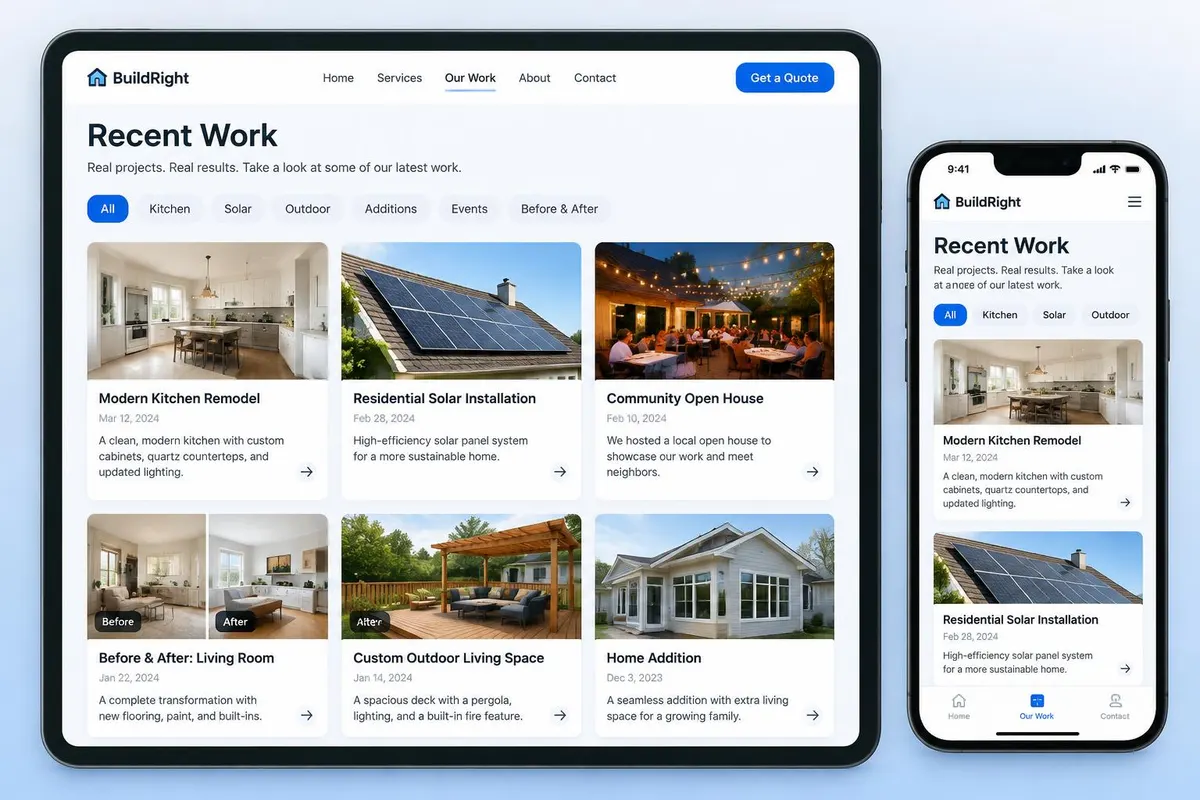
Recent Work is more than a photo gallery. Every project sits on your own Bio / Profile Page, can be shared on its own with a link or QR code, tells you where the attention came from, and connects interested visitors to your CRM — so a browse turns into a conversation.
Proof people can see
Visual results sell better than any description.
Every project travels
Share one project, not a whole page.
Interest becomes a lead
Subscribers and clicks land in your CRM.
A static gallery shows your work. Recent Work shares it, measures it and turns it into follow-up.
Show your work, share it, and see what it does.
Four things Recent Work gives you that a static gallery cannot.
Show your work
Publish completed projects with photos, a category, a date and a short story of what you delivered.
Share it anywhere
Send a single project by link, QR code, email or social post instead of pointing people at a whole page.
Grow an audience
Visitors can subscribe to new work and land in your CRM as real contacts.
Know what works
See views over time, which categories attract attention, and which projects generate leads.
Recent Work vs. an ordinary gallery
Portfolio sites and photo galleries display work. Upward connects it to your profile, sharing, analytics and CRM.
| Capability | Upward Recent Work | Photo gallery |
|---|---|---|
| Lives on your own profile page | Yes | Usually a separate site |
| Every project can be shared on its own | Yes | Rarely |
| Tracked links and QR codes per project | Yes | No |
| Visitors can subscribe to new work | Yes | No |
| Views, sources and categories measured | Yes | No |
| Interest becomes a CRM lead | Yes | No |
| Company work shared by the whole team | Yes | No |
Two kinds of work, one profile.
Company work is created once and displayed by the whole team. My work is yours — your customers, your projects, your results.
Company Work
- Published by the company and made available to members.
- Members choose whether it appears on their profile.
- Can be marked required so it always shows.
My Work
- Projects the member completed themselves.
- The member controls photos, description and category.
- Public or private at any time.
Built for work people can see.
If the result is visual, Recent Work turns it into marketing.
Trades & home services
Roofing, remodels, installations, before-and-after results.
Property & real estate
Listings sold, staging, developments and site work.
Hair & beauty
Cuts, colour, styling, nail designs and transformations.
Events & speakers
Stage presentations, workshops, conferences and live events.
Add a short video to any project.
Paid plans can upload a project video alongside the photos, so visitors watch the result — not just look at it.
One video per project
Upload an MP4 or WebM walkthrough, before-and-after or customer reaction that plays at the top of the project.
Photos still lead
The first photo stays the cover image everywhere the project appears.
Uses your plan storage
Project videos live in File Management and use the storage included with your plan.
Included with paid plans
Free plans add photos only. Upgrade to add video to any existing project later.
Every project can travel on its own.
Share a project the way that suits the conversation — each way is measured separately.
Quick Link
A simple link to the project, ready to paste anywhere.
Tracked Link
Records clicks and attributes them to a CRM contact or campaign.
QR Code
Perfect for print, vehicle wraps, signage and job-site handouts.
Profile, Social & Email
Feature work on your Bio page, post it socially, or include it in a newsletter.
Attention that becomes follow-up.
Subscribers are added to CRM with the source recorded, and every view is attributed — profile, tracked link, QR code, social, email or direct.
- 1
Publish a project
Photos, category, date, optional video and the story of the result.
- 2
Feature it on your profile
Shown beside your reviews, videos and booking.
- 3
Share it your way
Quick link, tracked link, QR code, email or social.
- 4
Visitors engage
They view, click and subscribe — captured in your CRM.
- 5
Follow up
Activity is logged and Vutesa suggests the next move.
Know which project to share next.
See views over time, top categories and the projects that generate leads. Vutesa explains what changed, why it matters and which project is worth sharing again.
Frequently asked questions
Can company projects appear on member pages?
Yes. Company work is created once and members choose whether it appears on their profile, unless it is marked required.
Do visitors become leads?
Subscribers and people who respond to a shared project are captured as CRM contacts.
Ready to turn every conversation into growth?
Start free, then replicate your system across your whole team.